scroll 1

Welcome to my blog breaktheandroid.blogspot.com here you can surf my blog tutorials for to get root access of your android smartphones and able to update your knowledge in new technologies and the market trend of smart phones and technology era

Navigation

scroll 2

Happy to announce that our Android App Is ready to download in Play Store click here to download the application and stay updated

Showing posts with label Android 5.0 Lollipop. Show all posts

Monday, June 1, 2015

Samsung Galaxy A5 starts getting Lollipop update in Poland

Just a couple of days after Samsung began rolling out the Lollipop update for the Galaxy A7, the Galaxy A5 (SM-A500FU), which was announced by the company back in October last year and released a couple of months later, has also started receiving the update.
Weighing in at 1GB, the update brings Android 5.0.2 OS, a new TouchWiz UX influenced by the new Material Design, new lock-screen and notification panel, better battery life, as well as performance and stability improvements.
The update is currently rolling out in Poland, where it is available both over-the-air (OTA) as well as via KIES. If all goes smoothly it should expected to reach more markets next month.

Tuesday, May 5, 2015

Samsung acknowledges Galaxy S5 Lollipop update issues

Back in March this year, the Android Lollipop update for the Galaxy S5 (as well as the S4) was put on hold by Samsung Norway due to some major issues, but as the update reached the UK the following week, we thought it was an isolated problem. However, now we learn that's not the case.
Users of the Galaxy S5 have been complaining about the update in the UK, too, and just days ago the local branch of the South Korean company finally admitted to the issues plaguing the update, promising to roll out "micro updates" to help resolve them.

Source | Via

Android Lollipop with Flyme OS 4.5.1 arrives on Meizu MX4 Pro

As expected, the high-end Meizu MX4 Pro began receiving Android Lollipop. Sized 650MB, the new firmware is seeding to the smartphone over-the-air.
After the update, the smartphone will boot to Android 5.0.1 with Flyme OS 4.5.1A. Meizu MX4 Pro launched with Android 4.4.4 with Flyme OS 4.0.
Reportedly, Meizu MX4 Pro has become significantly more responsive thanks to the new ART runtime in Android Lollipop. The update is also said to improve the accuracy of the device’s home button, as well as partially address its heating issues.
If you are a Meizu MX4 Pro owner, head over to the device’s settings to check if the new firmware is available.

Asus releases Lollipop update for ZenFone 5

Asus has released the Android Lollipop update for its ZenFone 5 (A500KL) smartphone, which went on sale back in July last year.
After installing the update (click the Source 1 link below to download it), which is 819.44MB in size, you'll be on software version TW_V12.4.5.21. However, the Taiwanese company is advising users to upgrade their devices to software version V11.4.6.94 before installing the Lollipop update.
As for other ZenFones, here's is the Android Lollipop update plan:

Wednesday, April 29, 2015

Sprint joins Verizon in releasing Lollipop for the LG G2

People generally consider Verizon to be America's worst carrier when it comes to software updates (or rather, how fast it is in releasing them). However, for the LG G2 Verizon proved to be a lot quicker with the Lollipop release than Sprint.
Verizon's G2 units have been getting the tasty treat since last month, whereas Sprint is only now commencing its over-the-air rollout.


So if you own an LG G2 bought from Sprint, expect to see an update notification popping up soon - within the next few days or weeks, that is. The new release contains everything that's new in Android 5.0 (both from Google as well as LG), but also an "update to FM radio software".
After applying the update, you'll be on software version ZVG. The previous one was ZVE, released in October 2014.
As usual, if you're impatient and don't want to wait for the update notification, you can try to manually check by using the appropriate option in your phone's Settings menu.
Source | Via

Saturday, April 25, 2015

Samsung begins updating Galaxy A3 with Android Lollipop

Samsung is now seeding yet another Android Lollipop firmware update - this time around the Galaxy A3 is the lucky smartphone. Samsung previously announced the entire Galaxy A series will be treated to Lollipop, so we expect the Galaxy A5 and Galaxy A7 to follow suit soon.
The Galaxy A3 Lollipop update is available both over-the-air and via the Kies suite. The first country to get the new system update is Russia, but barring any issues with the firmware, it will spread globally in the matter of days.
The new firmware update for the Samsung Galaxy A3 brings Android 5.0.2 Lollipop OS, performance and stability improvements, better battery life, new TouchWiz UX influenced by the new Material Design, among other features and fixes.
If you have a Galaxy A3 you can expect this update to show at your update section very soon.
Thank you, Sanay, for the tip!

Tuesday, April 14, 2015

“Trusted Voice” is Android’s latest Smart Lock feature

Smart Lock is one of the coolest features included with Android 5.0 Lollipop; it offers a handful of clever ways to unlock your device automatically at the right time and place. Now, Google is rolling out another option that could be great for anyone who enjoys talking to their smartphone.
Trusted Voice apparently lets you unlock your phone by simply saying the words “Ok Google.” You can set up the new feature in just a few minutes, though Google notes that it’s not as secure as other methods. Someone with a similar voice could potentially trick your phone, or they could just use a recording of you to unlock the device.
Still, it’s a pretty cool addition to Smart Lock, which already includes Trusted Devices,Trusted Places and Trusted Face as alternative options. According to Android Police, Trusted Voice is just rolling out now to the first devices, so it could be a while before most people get to try it for themselves.

Sunday, April 12, 2015

Sprint's Galaxy Note 3 and Galaxy Note Edge receive Lollipop

Sprint is now in the process of pushing out the update to Android 5.0 Lollipop for both the Samsung Galaxy Note 3 and the Galaxy Note Edge. This follows last month's software release for the Galaxy Note 4 units sold by this particular carrier.
In both cases, the updates are rolling out over-the-air, so your handset should notify you when it's ready to download and install. As software updates are rolled out in stages, it may take a few days before they reach all the devices out there.


After applying the update, your Galaxy Note 3 for Sprint will run build N900PVPUEOC5. For this smartphone, the upgrade to Lollipop is all you'll see. In the case of the Galaxy Note Edge, however, some unnamed Wi-Fi calling enhancements are bundled too, along with "factory reset protection". If you own a Note Edge, the build you'll be running after applying the update is N915PVPU0AOC8.
Source 1 • Source 2 | Via

Lollipop for Xperia Z3 Dual, Z1, Z1 Compact, Z Ultra due next week

Sony is already rolling out the Android 5.0 Lollipop update for its Xperia Z2 and Z2 tablet across different regions. In the mean time, the company has promised to release the Lollipop update for the Xperia Z3 Dual, Z1, Z1 Compact and Z Ultra devices the next week.

Following that, Sony will release the Android 5.0.2 Lollipop update for the T2 Ultra and C3 smartphones. And finally, the company will roll out the update for the original Z series phones - Z, ZL, ZR and Z tablet.

Tuesday, April 7, 2015

HTC One (M8) for AT&T will get Android 5.0 tomorrow

HTC One (M8) owners on AT&T in the United States will begin receiving Android Lollipop tomorrow. Mo Versi, HTC's VP of product management announced on Twitter that the update has received technical approval.

The update will be available over-the-air. It brings a host of improvements to the HTC One (M8) headed by brand new ART runtime and Material Design update for the device’s native applications.
AT&T is the latest major carrier to update HTC One (M8) to Android Lollipop. The device's variants on Sprint, T-Mobile, and Verizon are already running the new firmware.
We benchmarked HTC One (M8) with Android 5.0 Lollipop back in January. You can find out about the change in its performance in our blog post.

Friday, April 3, 2015

YU Yureka to get a Lollipop update in first week of April

Micromax birthed YU Televentures has been taking direct shots with tongue-in-cheek references at Mi India as part of its online promotion for its next handset. In the meantime, the existing owners of theYureka handset raised a query against the anticipated Lollipop update.

YU support team's email response to many concluded that the Lollipop update for the Yureka can be expected in the first week of April. For Yureka, the Lollipop update would basically arrive packaged as the CyanogenMod 12S version.
Apparently, the CyanogenMod 12S update has been delayed for all supporting devices. Even OnePlusmissed it along with the deadline for OxygenOS.
Thanks for the tip, Pankaj!

Monday, March 30, 2015

T-Mobile’s Galaxy S6, S6 Edge gets first OTA update

Samsung’s new Galaxy S6 and Galaxy S6 edge are yet to go on sale, but those lucky enough to get their units a few days in advance are already been treated to their first firmware update. To enhance that experience, Samsung has pushed an OTA update for the Galaxy S6 and Galaxy S6 edge owners on T-Mobile.


The update weighs 178.67 MB and packs mostly stability improvements and under the hood performance tweaks. There is a brief mention of new and/or enhanced features but the exact features have not been listed in the changelog.
We presume all Galaxy S6 and Galaxy S6 edge devices will get this OTA update once the smartphones hit the shelves.
Via

Friday, March 27, 2015

Motorola Nexus 6 arrives officially in six new markets

Google expanded the availability of Motorola Nexus 6 to six new markets. The Android 5.1 Lollipop phablet is now available to purchase from the new Google Store in Austria, Denmark, Finland, Ireland, Norway, and Portugal.
This means that Google’s flagship handset is now available directly from Google in a total of 21 markets globally. The search giant and Motorola have clearly caught up with the brisk demand for the device, which caused quick sellouts at launch.
On a side note, Google also officially brought the Asus-made Nexus Player to the United Kingdom. The TV console is available from the Google Store and Amazon among others for £79.99.

Thursday, March 26, 2015

Huawei working on Lollipop running purported P8 Lite

A number of reports about Huawei’s next major handset P8 have been making rounds over the web. The company sent out invite for the launch of Huawei P8 on April 15, but it seems another smartphone might get announced alongside the next flagship.


As per TENAA's website a mysterious device with model number ALE-UL00 has been certified. Appearing very similar to the upcoming P8, this handset appears to be a watered down version of it. Check out the P8 schematics that leaked a while ago.


The listed device might be P8 Lite version with 5-inch 720p display and powered by unidentified octa-core 1.2 GHz mobile processor with 2 GB RAM, 13MP rear camera and 5MP front camera. By default, this handset will run Android 5.0 Lollipop with Huawei’s own Emotion UI.
Source | Via

Wednesday, March 25, 2015

Samsung Galaxy Note 3 for AT&T gets Android 5.0 Lollipop

Samsung Galaxy Note 4 for AT&T isn’t alone in getting Android Lollipop today. The carrier version of the phablet’s predecessor, Samsung Galaxy Note 3 also began receiving Android 5.0.
With a size of 1.2GB, the Android 5.0 update for Galaxy Note 3 SM-N900A s available over-the-air and carries the build number LRX21V.N900AUCUEOC1.
Android 5.0 brings a host of changes and improvements to Samsung’s 2013 flagship phablet. They include refreshed TouchWiz user interface and brand new ART runtime among others.
If you are an owner of Samsung Galaxy Note 3 for AT&T, head over to its settings to check for the new firmware. Keep in mind that you can only download the update over Wi-Fi.
Source | Via

AT&T's Samsung Galaxy Note 4 receives Lollipop update


Following a few previous rollouts across the world, AT&T's version of the Samsung Galaxy Note 4 is now in the process of receiving its update to Android 5.0 Lollipop.
The carrier has posted the relevant documentation on its website, and the official rollout start has happened today. The update comes in at around 1.2GB, so it may take a while to fully download. That's also why you can only grab it via Wi-Fi.
Aside from the Android system version bump, and all the features that Lollipop brings with it, the new software features some stability improvements, and two service additions - Find My Mobile and Reactivation lock.
Otherwise, we're looking at the same Samsung TouchWiz-infused Lollipop interface that we've seen in the company's other updates recently. After applying the update, you'll be on Android 5.0.1 and build number LRX22C.N910AUCU1COC2.
As always, keep in mind that the rollout is probably staggered, so it might take a few days until it reaches your particular device. If you're feeling impatient, you can always manually check for it by going to Settings > About device > Software update.
Source | Via

Tuesday, March 24, 2015

Instagram Launches Layout, Its Own Photo Collage App


Instagram today announced the debut of a new application called Layout, the company’s next standalone creation tool outside of its flagship photo-sharing application. With Layout, Instagram users will be able to quickly build collages using their mobile photos, which they can then choose to share to Instagram, Facebook, or elsewhere.
Collage-making is already a popular activity on Instagram, the company tells us. One in five monthly active users on Instagram use a collage app at least once, we’re told. Today, the app stores are filled with utilities that offer this sort of capability – including apps like Pic Stitch, Pic Collage, InstaCollage, PhotoGrid, and many others. The apps are all similar in nature – they offer a variety of blank photo grids which users can customize with their own photos, and sometimes optional text or stickers.
To Instagram’s credit, it didn’t just knock off the existing collage-making apps already on the market, but instead tried to come up with an app that would improve the experience for mobile users.
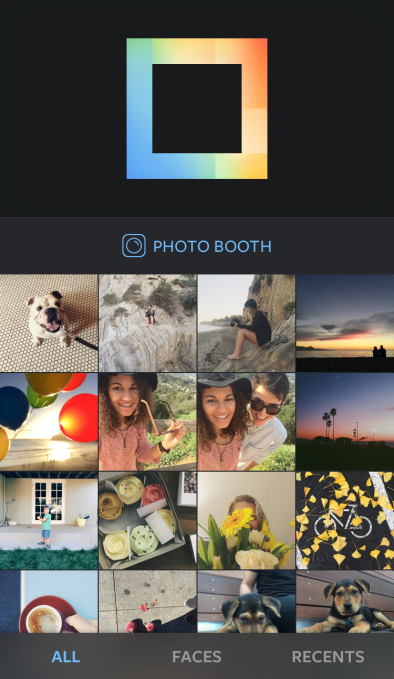
UI-Home
In Layout, Instagram offers a new take on how collages are built by changing the order of the steps involved in the process.
“The first thing you see is a view of the Camera Roll,” explains Joshua Dickens, Product Designer at Instagram. “Most apps give you a bunch of empty grids. But more important is choosing the photos you want to share, before you lay them out,” he says.
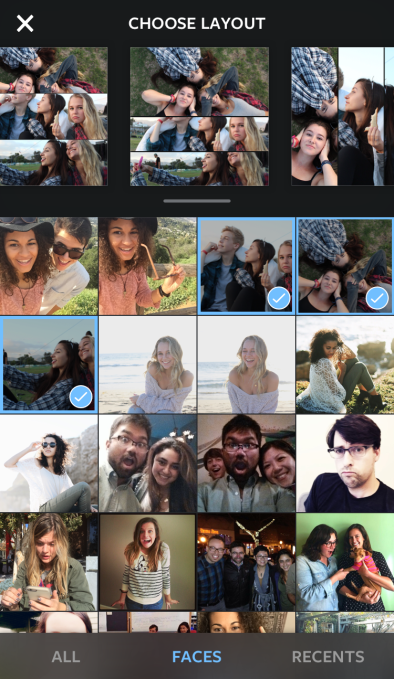
As you tap to select the photos you want to use, Layout then presents previews of custom layouts you can scroll through at the top of its screen. You can select up to nine photos using Layout, and each time to tap to add another, your photo grid options update automatically to reflect the new additions. When you’re finished adding images, you can then flick through the presented options to choose the grid you like the best.

Faces

Another interesting feature in the collage-building process is the ability to tap onto a “Faces” button at the bottom of the screen to filter your Camera Roll to show only those photos with pictures of people. 90% of photos used in collages have faces in them, Instagram found, so this option will be useful to those who are filling their grids with photos of friends and family, instead of just cityscapes, objects, or other scenery.
UI-Faces Tab

Photo Booth

There’s also a “Photo Booth” button that lets you use Layout to capture more spontaneous moments. When you tap this button, the app starts a countdown timer and then captures a series of photos that you’ll see appear instantly in a layout.
Having used a number of the photo collage apps in the past, I found that the way Layout flipped the first few steps involved with making a collage – that is, first selecting the photos, then choosing the grid – significantly sped up the previously time-consuming process of collage building. For example, I was able to quickly create a few photo collages in a matter of seconds over the weekend – in the middle of a six-year old’s chaotic birthday party, of all places. In the past, the same activity using an app like Pic Stitch would have required a lot more time and trial and error to find the right grid and the best photos to use. With Layout, however, the process wasn’t just fast – but the learning curve to figuring out how all the features worked, too, was greatly reduced.
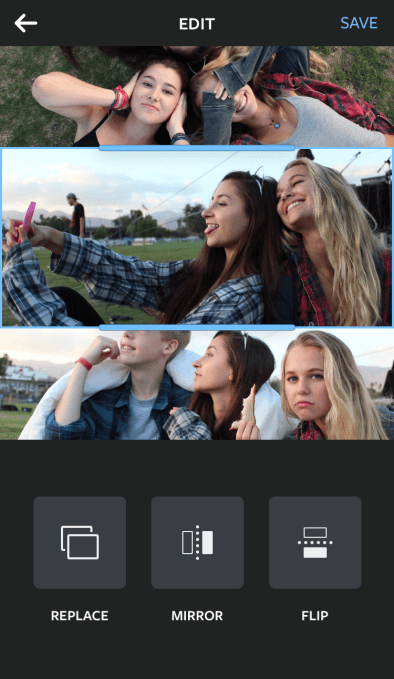
UI-Edit

Grid Options

Like other collage builders, Layout also allows you to pan the photos as well as pinch and zoom to better situate them. Plus you can grab the handles of a photo to resize it in the grid you’ve chosen, making it larger or smaller in relation to the others. A “replace” button lets you quickly pull up your Camera Roll again in order to swap out photos, which can be done with just a tap.
Swapping out photos all takes place on the same screen, too. Some apps I’ve used in the past would pop up the Camera Roll view in its own window, which made it difficult to think about which photo would look right in your current grid option. I preferred the way Layout does this instead.
Sample-8
Layout also offers a few differentiated tools, including the ability to tap buttons that flip images upside down or make photos mirror each other. This allows for more artistic creations, like turning landscape shots into ones with a cool water effect – where the land and sky seems to be reflected into a glassy pool, for example. It also offers a way to do more fun, “pop art” style shots, which could serve to spice up selfies or the popular “outfit of the day” shots many Instagram users post regularly.
Sample-5
When you’re finished with your collage, you can save the photo locally, share to Instagram, Facebook, or to other services whose apps you may have installed on your iPhone through iOS’s included sharing options.
Instagram had been researching the possibilities for an app like Layout since last fall, and the app itself has been in development over the past few months. Like its video app Hyperlapse, the company built Layout not to generate additional revenue for the company – there are no in-app purchases for things like more photo grids or effects, nor will it monetize through ads – but rather to encourage more photo-sharing to Instagram by fixing the problems with today’s current collage apps.
With the debut of Layout, it appears that the Facebook-owned company, which now sports over 300 million active users monthly, is working to find ways that allow it to keep its main app simple for its core audience, while also meeting the needs of more advanced users who are in search of better tools for working with their photos and videos. This fits in with the trend where Instagram has been looking at what other apps people are using as companions, and then trying to build the functionality itself, sometimes in Instagram’s core product, and other times as standalone apps, as with Hyperlapse.
“A key part of the Instagram vision is about inspiring creativity,” notes John Barnett, Product Manager at Instagram. “Creation should be simple, intuitive and fun,” he adds.
Layout is currently an iOS application, but an Android version will be released in the months ahead.

Leaked roadmap shows Meizu's plans for Lollipop updates


A purported leaked roadmap showing Meizu's plans for updating its devices to Android Lollipop has surfaced in China today. And it's all good news if you own a flagship device made by the Chinese company.
According to this leak, Meizu plans to bring the latest version of Android to at least five of its handsets, namely the MX4 Pro (pictured to the left),MX4, MX3, MX2, and M1. This is quite something, when you consider that the MX2 was released back in 2012.
Regarding the affordable M1, keep in mind that this designation could refer to the M1 series, meaning both the M1 and the M1 Note - since they were outed within weeks of each other.
As for the actual schedule, the MX4 Pro and MX4 could be blessed with Lollipop around April 28. The MX3 and MX2 should get their taste in May, while M1 owners will have to wait until June for their treat.
Obviously this isn't official, so things might still change. On one hand, it's good to see phones from 2012 running the latest version of Android, yet on the other hand by June Lollipop will have been out for around eight months already - so maybe in the future Meizu can also work on how fast it delivers such updates.
Source | Via

Monday, March 23, 2015

Galaxy Tab S 10.5 gets Android 5.0.2, France is first

Samsung has started rolling out the Lollipop update for the Galaxy Tab S 10.5, which was released back in July last year. The update comes in the form of Android 5.0.2, and is currently only available in France.
The over the air update is currently only rolling out for the Wi-Fi model of the device, with model number SM-T800. It carries a build date of March 17, 2015, and bumps the firmware version to T800XXU1BOCC.
Users of the Galaxy Tab S 10.5 in France can check for the update by heading to Menu -> Settings ->About device -> Software update on their device. The update can also be installed through Samsung’s Kies software utility.
Via

Sunday, March 22, 2015

What are the advantages and disadvantages of rooting your Android device?

If you are an Android user, I'm almost certain you heard the word “root” being thrown around. You've probably been asked if your phone has been rooted or if you plan to as well. Being uncharted ground to new users or people who have never bothered to look into it, the term “root” can be somewhat scary. What does it mean? Do you risk turning your phone into a very expensive paperweight? What are the advantages or disadvantages of rooting? Well, I am here to relieve you of your fears and answer those questions.
Typically the first thing I do to each Android device I buy as soon as I pop the battery in and power it on is root it. It's to the point now that I rely on a lot of applications that require root access. Without them I feel as if I'm not getting full functionality of my phone.

What does “root” mean?

Rooting is essentially giving you administrative access to your device. Once your device is rooted, you will have an application by the name of Superuser that can be found in your app drawer. This application is where you can control the permissions of any applications that require "administrative" rights. This is a simple way of looking at it.
I get asked by people all the time if rooting is like jailbreaking an iPhone. It's sort of the same concept, but don't get caught saying that around  any Android fans, you may get jumped.

Disadvantages

We'll start with the lesser of the two, drawbacks. Once your phone has been rooted, your manufacturer warranty is null in void. This is probably the number one reason for people not rooting their Android devices, but if you decide rooting is not for you, the process is just as easily undone. Reversal of this process leaves no evidence of ever having been done and your warranty is back in place.
Another negative that I'm aware of is the risk of bricking your shiny new toy. The chances of this are slim to none, but if you don't know what you are doing, your odds of creating the coolest paperweight in the office are much higher. If you choose to root, please read instructions carefully. The most important steps – they're all important – are likely in bold, red, or bold and red font usually followed by exclamation marks. Pay close attention to those steps.
Security is a growing issue in mobile devices, especially since many technologies are moving to mobile space. Gaining root access does bring to light some security concerns, but it isn't as serious as it seems. Nick Kralevich, an engineer on the Android Security Team, states that rooting, "...is not a feature of a device; rather, it is the active exploitation of a known security hole." He goes on to explain that Android is "backed by a solid implementation" and that applications are "sandboxed" from each other. This means that you have to allow permissions to any application that attempts to interact with another. You are in control, even when rooted.

Advantages

When it comes to advantages, the list is nearly endless. However, there are a few that truly stick out among the crowd. First and foremost, you have full control over your system. You can install applications like SetCPU that allow you to set the CPU speed of your device manually. It also allows you to overclock (set the processor speed higher than the manufacturer rating) your device, but I wouldn't recommend that unless you know what you're doing. Other performance tweaks like the relocation of caches (browser, maps, market, etc.) can also be utilized with root access to improve the speed and battery life of your device.
The most annoying thing about buying subsidized phones is the carrier bloatware that nobody really wants to have to filter through. With root access you can remove whatever you want and install essentially whatever you want – barring it's compatible with your phone – at your own leisure. You're taking charge of your device, in a sense.
Along with rooting you will often hear words like custom recovery and ROM. These are generally for the more advanced users, but what these things allow you to do will extend the customization of your device to nearly endless possibilities. Installing a new recovery, or flashing as it is commonly called, allows you to create backups of your device on your SD card. Much like your computer's recovery can create a backup image of your current settings, files, etc., the custom recovery you flash to your Android device will back everything up so when you restore it, it is exactly how you left it down to the settings, applications, and text messages.
Custom ROMs are different versions of Android that have been modified by developers to make it look, feel, and operate however they want. For example, the myTouch 4G ships with it's own version of Sense UI, nicknamed Espresso 2.0. I grew bored with it and someone had created (ported) a custom ROM for the myTouch that was actually the software from the Desire HD, which is skinned with an entirely different version of Sense UI. Using custom ROMs, you can have both your hardware and software of choice, given that the hardware you choose has developers working on it.
Even if you don't want to go to the extreme of using custom ROMs, root access will allow you to install applications that weren't necessarily meant for your device. For instance, if there is an application that is specific to a carrier or manufacturer, given the proper tweaks by a developer, it can be installed on nearly anything running Android.
There have been home replacement applications in the Market available to non-root users for quite some time. A unique benefit over launcher replacements is the ability to theme. However, theming a launcher doesn't venture too deep into the system. Using themes created for specific ROMs, you can totally deck your device out however you want to. Applications like MetaMorph can help you with this process.

Takeaways

As you can see, the advantages of rooting far outweigh the disadvantages. This doesn't mean it is for everyone though. Some people will live happily ever after without ever having to root their Android device. If you are interested in rooting or diving a little deeper into Android and seeing how you can get your hands dirty, head on over to PhoneDog's Android network site,DroidDog.com. There you will find a little more than just your typical Android news.
The most important part of all is knowing your risks. Rooting can be dangerous if you don't have the proper know-how and jump into the process all willy nilly. Be patient, read instructions carefully, and don't be afraid to ask for help. You also must now that you are doing this at your own risk. If your device becomes damaged in the process, PhoneDog nor DroidDog are at fault. I am not telling anyone to go root their device now, I'm simply educating on what it is and how it can be used. You have been warned.
With that out of the way, don't look at rooting like it's a dirty word. Carriers and some manufacturers make it out to be; but rooting can be fun and extends the capabilities of your handset immensely. Straight from the Android Security Team over at Google comes this quote about rooting, “It should be no surprise that modifying the operating system can give you root access to your phone. Hopefully that’s just the beginning of the changes you might make.”